SERVFORU

Latest Post

How to Install NS2 and NAM in linux mint & Ubuntu


 Take a look into the installation of a very famous tool that is widely used in Network related researches. Network Simulator or NS as it is popularly called is formally defined as a "discrete event simulator". For a post graduate in Computer Engineering or a PhD scholar it is, in simple terms, a valuable tool that greatly aids in simulating their concepts in wired and wireless networks.

 To install NS in Linux 
 Requirements
  •   ubuntu 10.10 or higher
  •  an internet conenction 
if you have both  follow the simple steps 

   1. open the Terminal
   2.First update the Ubuntu repos:
                       
                  $sudo apt-get update


   3.  to install ns2           $ sudo apt-get install ns2


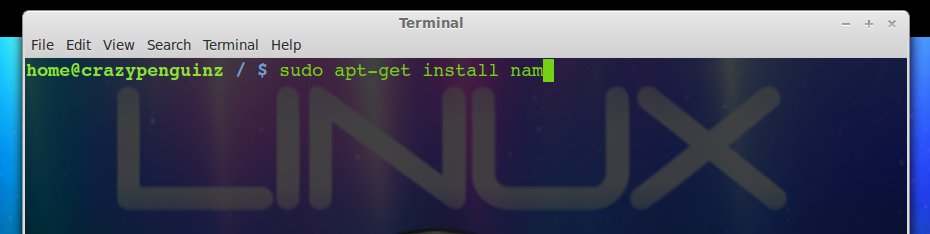
  4.  to install nam          $ sudo apt-get install nam

After this whenever you need to run a tcl script just type the following from the location where you have the tcl script:
$ ns somefile.tcl
 

NS2 : A real-time network simulation tool


NS2 is an open-source simulation tool that runs on Linux. It is a discreet event simulator targeted at networking research and provides substantial support for simulation of routing, multicast protocols and IP protocols, such as UDP, TCP, RTP and SRM over wired and wireless (local and satellite) networks. It has many advantages that make it a useful tool, such as support for multiple protocols and the capability of graphically detailing network traffic. Additionally, NS2 supports several algorithms in routing and queuing. LAN routing and broadcasts are part of routing algorithms. Queuing algorithms include fair queuing, deficit round-robin and FIFO.
ns-2 was built in C++ and provides a simulation interface through OTcl, an object-oriented dialect of Tcl. The user describes a network topology by writing OTcl scripts, and then the main ns-2 program simulates that topology with specified parameters. It runs on LinuxFreeBSDSolaris and Mac OS X. It is licensed for use under version 2 of the GNU General Public License.
Ns is often growing to include new protocols
NS2 Goals
• To support networking research and education
– Protocol design, traffic studies, etc.
– Protocol comparison;
– New architecture designs are also supported.
• To provide collaborative environment
– Freely distributed, open source;
– Increase confidence in result


NS architecture 

Object-oriented & modular
pros: code reuse (e.g., TCP variants), maintenance
cons: performance (speed and memory), careful planning of modularity 

Software structure
  • uses two languages: C++ and OTcl (Object TCL) -to achieve separation of control- and packet level
             C++ for packet processing
               • fast execution, detailed, full control over execution
               • to make simulator scalable, packet processing must be done at C++ level
             OTcl for control
                   • simulation setup, configuration, occasional actions (e.g., creating new TCP flows)
  •      compromise between speed and abstraction level(s) offered to the user
  •      draw back: need to learn two languages and debug in two “worlds” 


Who REALLY celebrates ? , Friendshp day


There is not much literature or history on Friendship Day.However, there are numerous folktales, biblical stories and several instance inmythological legends that shows that friends and friendship have been valuedsince the beginning of civilized world. For one of the bible verses states,
"Greater love hath no man than this that a man lay downhis life for his friends."

In the year 1935 the United States Congress announced thefirst Sunday of August as the National Friendship Day. It was initially declareda holiday in honor of friends. From then on, world joins together to celebrateFriendship Day with much enthusiasm and fervor.


BUT NOW ITS ALL commercialized

Just as in US and several other countries, Friendship Day has been commercialized to a great extent in India. Days before the festival, gift marketers run an extensive campaign to lure the people to buy cards and gifts for their friends. Restaurateurs too try to entice people by offering special discounts or holding bashes. Several people criticize such excessive campaigning. They feel commercialization has marred to the idea behind observing Friendship Day and has turned it into a mere formality. Some people however feel that advertising campaign has helped to generate awareness about Friendship Day festival and the idea of having a day dedicated to friends.
it is doubtful card sellers earned billions even though that is what the greeting card companies have earned over the years from the enormous sales of these cards over the years. 

Mobile commerce

Even more interesting to telcos in search of new sources of service revenue, more than 30 billion short messaging system (SMS) messages are sent per year.service providers uses  SMS as Business Tool


Start blogging


How To Start A Blog 
Friends and family members often ask me how to start a blog  here is simple steps to start a blog

1. Decide What You Want To Blog About

There are a lot of bloggers on the web already. If you want to attract readers, you are going to need to establish your credibility. Don't just blog about anything. Pick a topic you are are passionate about. Something that you have lots of experience with.

Politics: There are certainly enough opinions out there already, but you may have a point of view that needs to be heard.

Food: Who doesn't love good food? 

Movies: Reviews of movies new and old are always fun for movie buffs, and if you keep it fresh, 

Tech: Technical junks that you hear day by day 


Your favorite thing. Whatever that is, that hobby or pastime, that thing that gets you excited every time you think of it—write about it! You will no doubt attract readers who share your passion or pursuit, and you will learn some new things in the process.

2.  If you decided to blog  , Then follow the steps

  • Open the site http://www.blogger.com in your Web browser 
  • Click the “CREATE A BLOG” button.

  • On the following page you’ll be prompted to create a Google Account (if no Google account yet).

  • Once you’re done with Account, click the “Create a blog” link.

  • Enter a Title for your blog (any title you liked).

  • Enter Address (URL) of your blog - you can use the title of your blog.

  • And then type the word in the verification section and click “CONTINUE”.

  • On the next step choose a template, which you like most.  

You see, in eight steps you created your blog site successfully. Now to see that your blog is really a blog write and publish your first blog article – go to:

  • Click the “START BLOGGING” button.

  • Click the “Compose” link to switch to text mode.

  • In the Title box enter (the title of your first blog article)


  • Then enter few sentences about you, who you are, what you are doing, what country you live, about your family and friends.

  • On the next line type your unique signature (it either a name, text words or whatever you like) on your chosen signature you can link the URL link of your business website or other links of the websites you are writing with or your other personal blog site.

  • Then select this signature and press the “Link” button found at the upper part of the editor compose section.

  • In the “URL” box enter the following address you have chosen for your signature: and click the “OK” button.

  • Add labels or tags about your first blog article.

  • Now your blog is ready. Click the “PUBLISH POST” button.


BEFORE INSTALLING WINDOWS 8

Windows 8 Release Preview is available as a free download and it is very likely that your existing system specs are good enough to run Windows 8.

you can download it from the link  
release preview


The System Requirements for Windows 8
According to this Windows 8 FAQ, any machine equipped with 1 GB of RAM, 16 GB of hard disk space and 1 GHz processor should be able to handle Windows 8. The minimum RAM requirements are 2 GB in case you would like to install the 64-bit version of Windows 8.
Should you download Windows 8 Setup or the ISO Image?
As you may have noticed on the Windows 8 download page, the installation of Windows 8 can be done in two ways.
  1. You can either take the easiest route and download the Windows 8 Setup program – that’s also the default option.
  2. Alternatively, you can download ISO Images of Windows 8.
If you are planning to install Windows 8 on your existing computer, either on a different partition (dual-boot) or just want to upgrade from an older version of Windows to Windows 8, the default Setup program is a good choice.
Please note that that your installed software programs will only be preserved if you are upgrading from Windows 7 to Windows 8. If your planning to install Windows 8 on top of Windows XP or Vista, only the files will be preserved but not the various software programs that you may have on the disk.
The Windows 8 ISO image may be more handy in other situations like:
  1. Your computer has an x64 processor but is currently running the 32-bit version of Windows. If you want to install the 64-bit version of Windows 8, download the 64-bit ISO.
  2. You want to install Windows 8 on your Mac (iMac or Macbook) using Boot Camp software.
  3. You want to install Windows 8 on multiple computers. In that case, you can download the ISO once, create a bootable DVD and boot the other systems using this newly created Windows 8 disk.
  4. You plan to run Windows 8 as a Virtual Machine inside your existing copy of Windows.
  5. You are running Windows XP.
The universal product key for Windows 8 is TK8TP-9JN6P-7X7WW-RFFTV-B7QPF.
Will my software programs run inside Windows 8?
Before grabbing the ISO image of Windows 8, quickly run this setup utility and it will show a list of all software programs and hardware drivers on your system that are compatible with Windows 8. Alternatively, you can visit this page to see a list of all known software and hardware devices that are found to be working with Windows 8.
How should I go about installing Windows 8?
You can have Windows 8 on your computer in three ways – you can install Windows 8 side-by-side(also known as dual-boot), as a virtual machine (so that it runs inside your existing Windows just like any other software) or you can have Windows 8 as your primary OS (there’s no going back from here).
If you just want to try out Windows 8   but without modifying any of your existing set-up, the safest bet is to use a Virtual Machine. If you have a vacant disk partition or don’t mind creating one (it’s easy), go for the dual-boot option. Else, if you have a spare computer, you can consider upgrading to Windows 8 overwriting the previous installation of Windows.
Also note that if you are upgrading from Windows 8 Consumer Preview to the new Windows 8 Release Preview, none of your installed programs, files and account settings will be preserved though everything would be moved to the windows.old folder.


BUT I DON'T  PREFER WINDOWS 8 , YOU CAN GO FOR SOME LINUX DISTROS Like UBUNTU , MINT  , much better than windows 8


Interesting facts about Linux


1.Linux has caught on in many sectors and probably one of the least known is the film industry. 95% of the servers used by Hollywood studios for animation films have installed a GNU / Linux. In fact, the Oscar-winning visual effects of the Titanic by James Cameron came from machines with Linux and, according to James Cameron, Avatar was the first film shot entirely in 3D applications using free software on Linux machines.

2. 90% of the world's most powerful supercomputers using an operating system GNU / Linux, in fact, the top ten of supercomputers use Linux..IBM chose Linux for what is expected to be the world's most powerful supercomputer, Sequoia, due in 2011.Linux powers 446 of the world's top 500 supercomputers.

3.Linux is present in highly critical applications such as Japan's bullet trains, traffic control, San Francisco, the New York Stock Exchange, CERN, many air traffic control systems or control of nuclear reactors of submarines and ships many nuclear war.

4.There are over 300 distributions GNU / Linux activities ranging from the well known Ubuntu or Debian distributions through governmental or educational level.

5.Countries such as Russia, Brazil and Venezuela have put their focus on Linux as a basis for interoperable management , cost efficient and technologically independent.
6. Linux has a strong following in smartphones and other devices in the consumer electronics world.Palm's WebOS, Google's Android and Nokia's Maemo smartphone operating systems are built on top of the Linux kernel.

7. Torvalds created Linux based on the GNU General Public License (GPL).Under the GPL, any person or group distributing the Linux kernel must make the source code available to the recipient of the package. Said Torvalds: "Making Linux GPL'd was definitely the best thing I ever did."

8.The Debian distribution was one of the first truly community-oriented Linux coding projects. Debian v. 4.0's source code containes 283 million lines of code. Debian's code base remains the foundation for other distros such as Ubuntu, Knoppix and Xandros

9$7.37 billion: projected cost to produce that amount of code in a commercial environment.
10.Red Hat was one of the first commercial Linux distributions to truly cater to the enterprise.

11.Ubuntu was the first Linux distro to be offered by a major OEM (Dell) to desktop users.

12. The Xandros distribution helped make the netbook craze possible when it was chosen by ASUS for the first iterations of the EeePC.

13.In 2002, The Register claimed Microsoft spent $421 million just to fight Linux.

14.The Indian state of Kerala made it mandatory for all of its high schools to run Linux on their computers.The federal government of Brazil favors Linux operating systems over all others in its PCs.


Advantages of using Linux

Many of my friends keep on asking me whether is Linux is easy to use? I am familar with Windows family.Can i try Linux Os? Answer is here
Cost The most obvious advantage of using Linux is the fact that it is free to obtain, while Microsoft products are available for a hefty and sometimes recurring fee. Microsoft licenses typically are only allowed to be installed on a single computer, whereas a Linux distribution can be installed on any number of computers, without paying a single dime.
Easy installation, a massive package repository and a dedicated user community help keep Ubuntu a great choice for newcomers.
One of the few distributions to dramatically change the look of the default KDE desktop.
The result of a fusion between a noble cause and an uncompromisingly corporate business plan.
Blows a breath of fresh air across a world dominated by brown, blue and purple.
SUSE Linux Enterprise Desktop gives businesses greater flexibility.

Security – In line with the costs, the security aspect of Linux is much stronger than that of Windows. Why should you have to spend extra money for virus protection software? The Linux operating system has been around since the early nineties and has managed to stay secure in the realm of widespread viruses, spyware and adware for all these years. Sure, the argument of the Linux desktop not being as widely used is a factor as to why there are no viruses. My rebuttle is that the Linux operating system is open source and if there were a widespread Linux virus released today, there would be hundreds of patches released tomorrow, either by ordinary people that use the operating system or by the distribution maintainers. We wouldn’t need to wait for a patch from a single company like we do with Windows.
Choice (Freedom) – The power of choice is a great Linux advantage. With Linux, you have the power to control just about every aspect of the operating system. Two major features you have control of are your desktops look and feel by way of numerous Window Managers, and the kernel. In Windows, your either stuck using the boring default desktop theme, or risking corruption or failure by installing a third-party shell.
Software - There are so many software choices when it comes to doing any specific task. You could search for a text editor on Freshmeat and yield hundreds, if not thousands of results. . Regular users and programmers contribute applications all the time. Sometimes its a simple modification or feature enhancement of a already existing piece of software, sometimes its a brand new application. In addition, software on Linux tends to be packed with more features and greater usability than software on Windows. Best of all, the vast majority of Linux software is free and open source. Not only are you getting the software for no charge, but you have the option to modify the source code and add more features if you understand the programming language. What more could you ask for?
Hardware (Efficiency- Linux is perfect for those old computers with barely any processing power or memory you have sitting in your garage or basement collecting dust. Install Linux and use it as a firewall, a file server, or a backup server. There are endless possibilities. Old 386 or 486 computers with barely any RAM run Linux without any issue. Good luck running Windows on these machines and actually finding a use for them.
Flexibility 
You don’t have to deal with anti-piracy schemes and additional “hoop jumping” dont have to crack any .

There isn’t like 1 Anti Virus solution, or a few access control solutions (SELinux, grsecurity, etc)…In Windows, there’s like 50+ Anti Virus solutions, a whole dozen anti-malware apps, intrusion prevention, anti-this, anti-that, etc…People say this one is better, others say that one is better. In less than 10min, you’d be pretty confused as to which is the best for your needs! 


Now that you have an understanding of some of the advantages of Linux, its time get out there and experiment. Windows can be a great tool for the lazy and incompetent, but it takes a true scholar and one who wants to learn to run a robust operating system like Linux.


TOP 10 extenstions for google chrome

Below I list the top 10 Chrome extensions to get you started.
1. AdBlock - Some claim that ad blocking is killing the free Web, others say that ad blockers are simply killing bad advertisers. Whatever your position, anyone looking for an equivalent of Greasemonkey for Chrome should start with the AdBlock Chrome extension. It strips out most ads from the majority of websites, making for a cleaner, faster (and, thanks to blocked autoplaying video ads, quieter) browsing experience
Current features: show number of Pages Indexed on Google, Yahoo...; show Page Rank by Alexa, Google...; show IP Address, Server Location...; Back-links; Social Bookmarks; Cached Versions.
Displays the number of unread messages in your Gmail and Google Apps inbox. Preview mail, read, delete, archive and mark as spam!
Many users admit it's better than the more-popular Google Mail Checker extension.

4. IE Tab- Some sites are optimized to run exclusively in Internet Explorer, especially Microsoft products like Outlook Web Access. Don't give up that native IE Web functionality 99just because you're using Chrome. The IE Tab Chrome Extension creates a virtual IE browser within Chrome, so you get all the Internet Explorer-ness without running two different browsers.

5. Docs PDF/PowerPoint Viewer - If Chrome has one glaring weakness, it's that it doesn't always handle PDF links very well. (I've had to kill more than a few stalled Chrome tabs that unknowingly tried to open PDF online forms.) The Docs PDF/PowerPoint Viewer Chrome extension sends any PDF or PowerPoint Web link to Google Docs, where the document can be read, surfed, printed or saved quickly and easily.

6. FastestChrome - FireFox users will call this Chrome extension FastestFox for Chrome, which is appropriate, since the two plug-ins share the same creator. The FastestChrome extension enhances Web searches. Highlight any word on a page to get a definition of the term, or launch a search for the text. On Google search results, additional results pages are automatically loaded so you can just keep scrolling. Relevant results from other search engines and sites -- like Amazon and Wikipedia -- are interlinked into standard Google search results. On Wikipedia pages, related articles are automatically loaded into the left-hand column. If you perform any amount of web research on a regular basis, the FastestChrome extension gets very addictive, very fast.

7. GooglePreview - The GooglePreview Chrome Extension is simple: It adds a thumbnail to the left of any Google search result showing a snapshot of the listed website. This is very helpful when you're looking for a site you visited but didn't bookmark, as the thumbnail image can help jog your memory. Also, if there are (ahem) unsavory images on the page, you'll know before you open the link

 While it might only really apply to web developers, Firebug Light is nevertheless one of the most essential tools you can think of to have alongside your Chrome installation if editing HTML and CSS is you cup of tea. Why's that? Firebug Light allows you to quickly pull up the full details of a given page, split into sections for easier scanning.

9. Sexy Undo Close Tab

Reopening a closed tab in Chrome is super-easy, right? Just hold down Control, jam Shift, and hit "T." Voila. Up pops the tab you were last viewing.Now, what if you wanted to check out a tab that you were viewing, say, eight tab-closes ago? Would you really want to pull up that many old tabs just to get to the single piece of information you sought? Dare you try to navigate your way through Chrome's history, which can itself be mucked up and confusing based on the browsing you've done through any number of individual tabs?
 10 . Xmarks
Xmarks the spot, as the joke goes. In this case, the "spot" is, "your comprehensive collection of bookmarks that you don't want to lose every time you hop to another system or web browser." And you won't, not with this awesome extension. For Xmarks gives you an automatic method for synchronizing your browser bookmarks to a centralized server-the "cloud," as it were-which you can then pull down onto any applicable browser installation… anywhere
 
 
Support : Ebin EPhrem | Ebin Ephrem | #Gabbarism
Copyright © 2011. Services | Embedded Support | Reviews | Virtual Technologys - All Rights Reserved
Template Created by ebinephrem.com Published by Ebin Ephrem
Proudly powered by Blogger