SERVFORU

Latest Post
Showing posts with label Recovery. Show all posts

Recover Formatted Deleted Data from your hard disk , USB , memory card


Recently I  unknowingly formatted my internal hard disk of laptop , about 500 GB of data lost . I got panic and i searched the ways to recover my data and i found a way using a opensource software called TestDisk , and its working , here is the step by step method

Requirements : Live bootable ubuntu or Linux Mint , i used Linux mint

install the test disk by

$sudo apt-get install testdisk

on terminal


after installing testdisk

go for recovery

1.open terminal
2. $sudo testdisk


3.


Log creation

  • Choose Create to instruct Testdisk to create a log file containing technical information and messages, unless you have a reason to append data to the logor you execute TestDisk from read only media and must create the log elsewhere.
  • Choose None if you do not want messages and details of the process to be written into a log file (useful if for example Testdisk was started from a read-only location).
  • Press Enter to proceed.


4. 

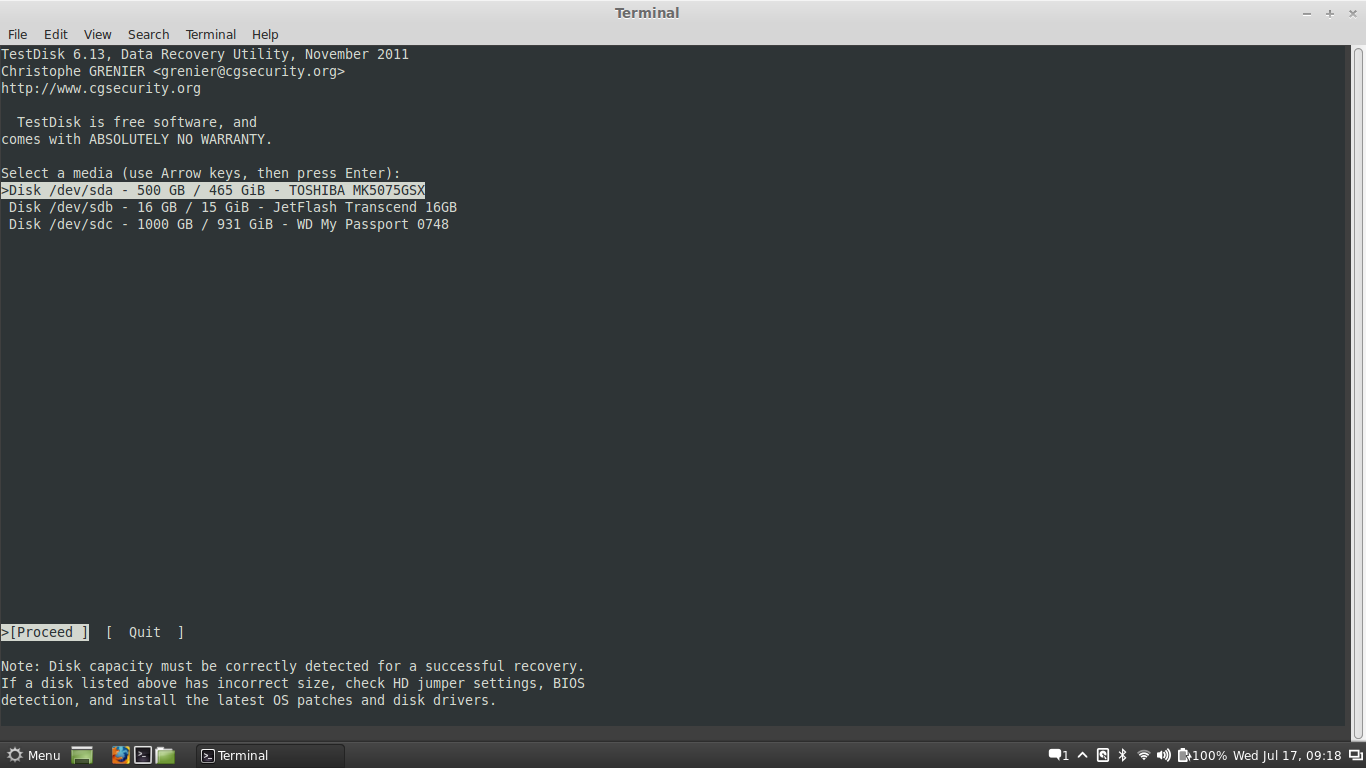
Disk selection


select the hard disk or device to recovered
  • Use up/down arrow keys to select your hard drive with the lost partition/s.
  • Press Enter to Proceed.

5. 

Partition table type selection


  • Select the partition table type - usually the default value is the correct one as TestDisk auto-detects the partition table type.
  • Press Enter to Proceed.

6.

Current partition table status


  • Use the default menu "Analyse" to check your current partition structure and search for lost partitions.
  • Confirm at Analyse with Enter to proceed.
he first partition is listed twice which points to a corrupted partition or an invalid partition table entry.
Invalid NTFS boot points to a faulty NTFS boot sector, so it's a corrupted filesystem.
Only one logical partition (label Partition 2) is available in the extended partition. One logical partition is missing.
  • Confirm at Quick Search to proceed.

Quick Search for partitions

  • Confirm according to your OS and created partitions to proceed.
7.

Save the partition table or search for more partitions?


http://www.cgsecurity.org/wiki/TestDisk_Step_By_Step

http://www.cgsecurity.org/wiki/TestDisk
 

HOW TO UPDATE OR RESTORE FIRMWARE IN GT-S5830C-i-M WITH ODIN3.

HOW TO MAKE THE PARTIAL BACKUP OR FULL BACKUP OF FIRMWARE.

-ClockWorkMod Recovery 5 - for use in future custons rom or partial back-up.-
CWM Recovery WORKING! not fleshable version, on reboot it back to stock recovery!
put file in your sdcard and run in original recovery same as apply update!
USE TO PARTIAL BACK-UP and RESTORE you ROM!


-Full backup with CWM to ODIN format.-
1. Copy both files ClockWorkRec_S5830C-i-M.zip and CWM_BackUP_FW_ODIN.zip to SDCARD.
2. Turn off the phone, press and hold VOL-UP + HOME + POWER.
3. Apply the update file ClockWorkRec_S5830C-i-M.zip from sdcard.
4. Apply the update file CWM_BackUP_FW_ODIN.zip from sdcard and wait the copy and generation of FW.


HOW TO UPDATE OR RESTORE FIRMWARE IN GT-S5830C-i-M WITH ODIN3.

To get stock FimWare go to FirmWares Stock SamSung if you phone model and operator is not listed go to FirmWare Checker and PUT your phone details, after minutes, You FirmWare stay available.

-To get phone details-.
*2767*4387264636# - viewer the product code.
*#1234# - viewer the PHONE PDA CSC versions.

-Sample of required details in SamFirmWare.com FirmWare checker-.
Product Code = GT-S5830OKCZTO
PDA = S5830CVJKL4
CSC = S5830CZTOKL4
PHONE = S5830CVJKL4

Sample of Check Fus Downloader, to download firmware direct from samsung servers!


To flash the FirmWare is needed SamSung drivers installed and the ODIN3 v3.07.

Turn off the PHONE, press and hold VOL-UP + VOL-DOWN + POWER
select download mode in screen and start ODIN3, inside ODIN3 select your files, PIT, BOOT, PHONE, PDA, CSC, the BOOT file not needed!

If you have only one file xxxx.tar.md5 put into PDA.

Only leave selected the checkbox, reboot and Factory reset.

Just press START!


Thanks all.
 

How to Root Samsung Galaxy Ace Plus (GT-S7500)

The Samsung Galaxy Ace Plus (GT-S7500) is the successor to the mid-range Samsung smartphone Galaxy Ace (GT-S5830). Announced by Samsung on January 3, 2012 for a release in the first quarter of 2012, the Ace Plus has a bigger screen and more powerful internals.


Warning:


  • You should be aware that  rooting an android device will make its warranty void.
  • You should download all required drivers- Drivers can be downloaded from below.


Download Required Driver:

  •  Here you can download all required files for rooting process
Odin3v1.87
Recovery 
Superuser-3.1.3-arm-signed

Let's Get Started:


  • Download CWM Recovery.7z from attachments. Extract Recovery.tar

  • Download Superuser-3.1.3-arm-signed.7z 

  • Extract Superuser-3.1.3-arm-signed.zip and copy it to your SD card (internal or external).

  • Put your phone in Download mode by holding down the volume down and home button and then pressing the power button. Flash Recovery.tar using Odin.

  • Put your phone in Recovery mode by holding down the volume up and home button and then pressing the power button. . Flash Superuser-3.1.3-arm-signed.zip from recovery

  • Reboot and Its Done!
 

How to Root & Install Custom Recovery on Samsung Galaxy Ace Plus S7500


Just Download Galaxy Ace Plus_CWM+ROOT Package (4 MB) Has all required files in it.


1Requires Samsung Kies (or Install from here)  (For Flash Drivers) + ADB Drivers 


2Put your device in Download Mode: Power off , press and keep 
Volume Down + Home + Power, when screen turns on leave power button. It will show Press up to continue. Press up to enter download mode.


3Run 1_Odin.exe, select the cwm.tar package as PDA, Press Start and wait for phone to reboot.
(You will see large yellow column  in odin if you had connected your phone in download mode. When your had successfully flashed, it will change to green,  red means an error, try again.) 


4After Reboot, Power off your mobile, Enter recovery mode by pressing 
Volume UP + Volume Down + Home + Power , Release Power button after you see the screen on.


5Run 2_Runme.bat (As Administrator, and turn off antivirus before or it will not work.)

Sometimes, if you got errors, then you need to Advance > mount /system from Clockwork Recovery and re run 2_Runme.bat. 

6) If it dont shows any error you are rooted. (Restart your phone)


Troubleshoot:

Batch file gives error(s) : 
1) Check Device Manager for ADB Drivers.
2) Mount /system from advance menu in CWM.
3) Disable Antivirus / Firewalls.
4) Run batch files as administrator.

How to go into CWM recovery:
Volume UP + Volume Down + Home + Power on startup. Let power button unpressed after screen is on.
 

How to install ClockWorkMode in Samsung Galaxy R i9103


I.  Before You Begin

1.  Make sure that you have backed up everything you feel is important before you proceed.
2.  Charge your device to more than 75% before you begin.

II.  Necessary Downloads

Clockworkmode

xda link is here

File Type: zipCWMv5.5.0.4_v1.zip - [Click for QR Code] (4.73 MB, 1720 views)

File Type: zipCWMv6.0.0.0_v1.zip - [Click for QR Code] (4.75 MB, 612 views)
File Type: zipCWMv6.0.0.3.zip - [Click for QR Code] (5.01 MB, 1620 views)


III.  Installing ClockworkMod Recovery on the Galaxy R

1.  Power down your device.
2. press Volume Down + Home Keys
3 .Get in to recovery menu
4. Select install zip from sd by using up and down keys

5.select the zip file and enter in to clockwork mode recovery
 

Reset User Password on Linux Mint & Ubuntu

if u forget the user password just  do the following steps


1. boot your computer while you press and hold “Shift” key
2. Select Ubuntu or Linux Mint blablabla  (recovery mode)

3. In the recovery menu select “root”
4. when the promt appears type:


mount -rw -o remount /

passwd “username”


where “username” is the username of the user that you don’t know the password
Now type a new password twice and you are done!
 

How to choose the best laptop that suits your needs


With a multitude of brands and models in the market combined with the very fast turnover in technology, it can really become such a headache when choosing what laptop to purchase for your mobile computing needs.
Now since these devices can be quite expensive, it is extremely important that the laptop you get will suit your needs as well as last at least 3 to 5 years or until you have money to upgrade on a newer model. With all these in mind, here are some ideas that you can tinker with and keep in mind when shopping around for laptops

Evaluate your needs.
People purchase laptops for different reason. Some people buy it for mobile gaming purposes while others use it primarily for work. Some purchase laptops for computing convenience while others use it to edit photos and videos on the fly. Well, if you are on the hunt for the best laptop for you, always consider first and foremost why you need the machine and what will you use it for. Reflecting on this first will help you decide on the specifications, dimensions, features, and brand of the laptop that you should purchase. This will surely narrow down your search.
Dimensions and weight.
Again, this aspect of a laptop is better left to the actual reason why you need a laptop. If you are a gamer or heavy into graphics, then having a large laptop with a nice 19 to 20 inch screen size might be the option for you. On the other hand, if you are the casual user focusing on being able to check your email and surf the web occasionally on the go, then consider a smaller and less bulkier one, something that has a 10 to 12 inch screen size. Decide if you want the machine to be lightweight and super thin as well.
Specifications.
For many people, all the other aspects won’t really matter since laptop value should be determined with the specifications. Yes, people want maximum computing power in relation to acceptable costs. Decide if you want an Intel or AMD duo or quad core processor. Decide on a 500gb or 1tb hard drive. Ramp up your memory from the standard 2gb to 6 or 8gb. Finally, will you be heavy on gaming or will you be a casual user to help you decide if you need advanced graphics card or the cheaper on-board ones. Specifications are equivalent to computing power and it is highly recommended to purchase a machine with this aspect primarily in mind.
Brand and warranty.
Some people choose laptops based on brands. For instance, brands like Dell, Apple, IBM, and HP are probably the most popular brands in laptops and most people will settle purchasing these. However, buying branded does not really equate to performance. Some of the smaller brands may provide better machines at less cost. However, if you are looking for solid warranties and support, then it would be a good idea to go with these major brands.
Features.
Again, this would depend on your needs. Need extra USB ports, powerful Wireless networking, an integrated card reader, a sim card slot for 3G connectivity, and extended battery life? Yes, these features should always6 be considered when shopping since these little things actually make the laptop more useful. Don’t forget to keep the features of a laptop in mind when choosing one.
In the end, it will all boil down to the cost for most people. You will definitely want to get value for your money. However, it will depend on what you need it for. This being said, determine your budget and needs and buy one that you think will suit both acceptably.


FOR MORE CONTACT ME
mail me: silentagentx@gmail.com
phone no: +91 9746558373
 
 
Support : Ebin EPhrem | Ebin Ephrem | #Gabbarism
Copyright © 2011. Services | Embedded Support | Reviews | Virtual Technologys - All Rights Reserved
Template Created by ebinephrem.com Published by Ebin Ephrem
Proudly powered by Blogger