SERVFORU

Latest Post
Showing posts with label tcl. Show all posts

NS2 , AWK script for finding the packet delivery ratio


Packet delivery ratio : the ratio of the number of delivered data packet to the destination. This illustrates the level of delivered data to the destination.
∑ Number of packet receive / ∑ Number of packet send
The greater value of packet delivery ratio means the better performance of the protocol.
###################################################################

# Initialization settings
BEGIN {

        sendLine = 0;
        recvLine = 0;
        fowardLine = 0;
        if(mseq==0)
mseq=10000;
for(i=0;i<mseq;i++){
rseq[i]=-1;
sseq[i]=-1;
}
}
# Applications received packet
$0 ~/^s.* AGT/ {
# if(sseq[$6]==-1){
        sendLine ++ ;
#       sseq[$6]=$6;
# }
}

# Applications to send packets
$0 ~/^r.* AGT/{
# if(rreq[$6]==-1){
        recvLine ++ ;
#         sseq[$6]=$6;
#        }

}


# Routing procedures to forward the packet
$0 ~/^f.* RTR/ {

        fowardLine ++ ;

}

# Final output
END {
        printf "cbr s:%d r:%d, r/s Ratio:%.4f, f:%d \n", sendLine, recvLine, (recvLine/sendLine),fowardLine;

}


###############################################################
 

Optimized Link State Routing Protocol (OLSR)

Optimized Link State Routing (OLSR) protocol for mobile ad hoc networks. The protocol is an optimization of the classical link state algorithm tailored to the requirements of a mobile wireless LAN. The key concept used in the protocol is that of multipoint relays (MPRs). MPRs are selected nodes which forward broadcast messages during the flooding process. This technique substantially reduces the message overhead as compared to a classical flooding mechanism, where every node retransmits each message when it receives the first copy of the message. In OLSR, link state information is generated only by nodes elected as MPRs. Thus, a second optimization is achieved by minimizing the number of control messages flooded in the network. As a third optimization, an MPR node may choose to report only links between itself and its MPR selectors. Hence, as contrary to the classic link state algorithm, partial link state information is distributed in the network. Thisinformation is then used for route calculation. OLSR provides optimal routes (in terms of number of hops). The protocol is particularly suitable for large and dense networks as the technique of MPRs works well in this contex


SAMPLE PROGRAM 

# ======================================================================
# Define options
# ======================================================================
set opt(chan)           Channel/WirelessChannel  ;# channel type
#set opt(prop)           Propagation/TwoRayGround   ;# radio-propagation model
set opt(prop)           Propagation/Shadowing   ;# radio-propagation model
set opt(netif)          Phy/WirelessPhy          ;# network interface type
set opt(mac)            Mac/802_11               ;# MAC type
set opt(ifq)            Queue/DropTail/PriQueue  ;# interface queue type
set opt(ll)             LL                       ;# link layer type
set opt(ant)            Antenna/OmniAntenna      ;# antenna model
set opt(ifqlen)         50                       ;# max packet in ifq
set opt(nn)             11                       ;# number of mobilenodes
set opt(adhocRouting)   OLSR                 ;# routing protocol

set opt(cp)             ""                       ;# connection pattern file
set opt(sc)             ""                       ;# node movement file.

set opt(x)              1000                     ;# x coordinate of topology
set opt(y)              1000                     ;# y coordinate of topology
set opt(seed) X
set opt(stop)           50                       ;# time to stop simulation

set opt(cbr-start)      5.0
set opt(cbr-stop)       45.0
set opt(pa-start)       7.0
set opt(pa-stop)        37.0
set opt(pa1-start)      9.0
set opt(pa1-stop)       39.0
# ============================================================================

#
# check for random seed
#
if {$opt(seed) > 0} {
    puts "Seeding Random number generator with $opt(seed)\n"
    ns-random $opt(seed)
}

#Ganho das antenas
Antenna/OmniAntenna set Gt_ 18.0
Antenna/OmniAntenna set Gr_ 18.0

Phy/WirelessPhy set bandwidth_ 11Mb

# frequencia (2.4 GHz 802.11b) {Alcance = 276 metros}
Phy/WirelessPhy set freq_ 2.4e+9

Mac/802_11 set dataRate_ 11Mb
Mac/802_11 set basicRate_ 2Mb

Propagation/Shadowing set pathlossExp_ 2.7       ;#expoente de perdas
Propagation/Shadowing set std_db_ 4.0           ;#desvio padrao (dB)
#Propagation/TwoRayGround set L_ 1.0

#
# create simulator instance
#
set ns_ [new Simulator]

#
# control OLSR behaviour from this script -
# commented lines are not needed because
# those are default values
#
Agent/OLSR set use_mac_              true
Agent/OLSR set debug_                true
Agent/OLSR set willingness           3
Agent/OLSR set hello_ival_           2
Agent/OLSR set tc_ival_              5
Agent/OLSR set mpr_algorithm_        1
Agent/OLSR set routing_algorithm_    1
Agent/OLSR set link_quality_         1
Agent/OLSR set fish_eye_             false
Agent/OLSR set link_delay_           false
Agent/OLSR set tc_redundancy_        1
Agent/OLSR set c_alpha_              0.6

#
# open traces
#
$ns_ use-newtrace
set tracefd  [open wtrace.tr w]
set namtrace [open simulation.nam w]
$ns_ trace-all $tracefd
$ns_ namtrace-all-wireless $namtrace $opt(x) $opt(y)

#
# create topography object
#
set topo [new Topography]

#
# define topology
#
$topo load_flatgrid $opt(x) $opt(y)

#
# create God
#
create-god $opt(nn)

#
# configure mobile nodes
#
$ns_ node-config -adhocRouting $opt(adhocRouting) \
                 -llType $opt(ll) \
                 -macType $opt(mac) \
                 -ifqType $opt(ifq) \
                 -ifqLen $opt(ifqlen) \
                 -antType $opt(ant) \
                 -propType $opt(prop) \
                 -phyType $opt(netif) \
                 -channelType $opt(chan) \
                 -topoInstance $topo \
                 -wiredRouting OFF \
                 -agentTrace ON \
                 -routerTrace ON \
                 -macTrace OFF

for {set i 1} {$i < $opt(nn)} {incr i} {
    set node_($i) [$ns_ node]
}

#
# positions

$node_(1) set X_ 160.0  #CAPACIT
$node_(1) set Y_ 485.0
$node_(1) set Z_ 15.0

$node_(2) set X_ 305.0  #DI
$node_(2) set Y_ 277.0
$node_(2) set Z_ 15.0

$node_(3) set X_ 340.0   #SECOM
$node_(3) set Y_ 226.0
$node_(3) set Z_ 15.0

$node_(4) set X_ 270.0  #Grad Basico
$node_(4) set Y_ 32.0
$node_(4) set Z_ 15.0

$node_(5) set X_ 476.0  #Reitoria
$node_(5) set Y_ 200.0
$node_(5) set Z_ 15.0

$node_(6) set X_ 628.0  #Incubadora
$node_(6) set Y_ 320.0
$node_(6) set Z_ 15.0

$node_(7) set X_ 570.0  #Musica
$node_(7) set Y_ 440.0
$node_(7) set Z_ 15.0

$node_(8) set X_ 780.0  #LABS
$node_(8) set Y_ 480.0
$node_(8) set Z_ 15.0

$node_(9) set X_ 918.0  #CT
$node_(9) set Y_ 597.0
$node_(9) set Z_ 15.0

$node_(10) set X_ 968.0  #Grad Profissional
$node_(10) set Y_ 550.0
$node_(10) set Z_ 15.0

# cores
$ns_ color 1 red
$ns_ color 2 blue
$ns_ color 3 yellow

# setup UDP connection
# CAPACIT -> GRAD PROFISSIONAL
set udp [new Agent/UDP]
$udp set class_ 1
set null [new Agent/Null]
$ns_ attach-agent $node_(1) $udp
$ns_ attach-agent $node_(10) $null
$ns_ connect $udp $null
$udp set fid_ 1

set cbr [new Application/Traffic/CBR]
$cbr set packetSize_ 40     # RTP + UDP + Payload
$cbr set rate_ 8Kb
$cbr attach-agent $udp
$ns_ at 5.0 "$cbr start"
$ns_ at 45.0  "$cbr stop"

#GRAD PROFISSIONAL -> CAPACIT
set udp1 [new Agent/UDP]
$udp1 set class_ 2
set null1 [new Agent/Null]
$ns_ attach-agent $node_(10) $udp1
$ns_ attach-agent $node_(1) $null1
$ns_ connect $udp1 $null1
$udp1 set fid_ 2

set cbr1 [new Application/Traffic/CBR]
$cbr1 set packetSize_ 40     # RTP + UDP + Payload
$cbr1 set rate_ 8Kb
$cbr1 attach-agent $udp1
$ns_ at 5.0 "$cbr1 start"
$ns_ at 45.0  "$cbr1 stop"

#REITORIA -> CAPACIT
set udp2 [new Agent/UDP]
$udp2 set class_ 3
set null2 [new Agent/Null]
$ns_ attach-agent $node_(5) $udp2
$ns_ attach-agent $node_(1) $null2
$ns_ connect $udp2 $null2
$udp2 set fid_ 3

set cbr2 [new Application/Traffic/CBR]
$cbr2 set packetSize_ 40     # RTP + UDP + Payload
$cbr2 set rate_ 8Kb
$cbr2 attach-agent $udp2
$ns_ at 7.0 "$cbr2 start"
$ns_ at 45.0  "$cbr2 stop"

#CAPACIT -> REITORIA
set udp3 [new Agent/UDP]
$udp3 set class_ 4
set null3 [new Agent/Null]
$ns_ attach-agent $node_(1) $udp3
$ns_ attach-agent $node_(5) $null3
$ns_ connect $udp3 $null3
$udp3 set fid_ 4

set cbr3 [new Application/Traffic/CBR]
$cbr3 set packetSize_ 40     # RTP + UDP + Payload
$cbr3 set rate_ 8Kb
$cbr3 attach-agent $udp3
$ns_ at 7.0 "$cbr3 start"
$ns_ at 45.0  "$cbr3 stop"

#REITORIA -> CT
set udp4 [new Agent/UDP]
$udp4 set class_ 5
set null4 [new Agent/Null]
$ns_ attach-agent $node_(5) $udp4
$ns_ attach-agent $node_(9) $null4
$ns_ connect $udp4 $null4
$udp4 set fid_ 5

set cbr4 [new Application/Traffic/CBR]
$cbr4 set packetSize_ 40     # RTP + UDP + Payload
$cbr4 set rate_ 8Kb
$cbr4 attach-agent $udp4
$ns_ at 9.0 "$cbr4 start"
$ns_ at 45.0  "$cbr4 stop"

#CT -> REITORIA
set udp5 [new Agent/UDP]
$udp5 set class_ 6
set null5 [new Agent/Null]
$ns_ attach-agent $node_(9) $udp5
$ns_ attach-agent $node_(5) $null5
$ns_ connect $udp5 $null5
$udp5 set fid_ 6

set cbr5 [new Application/Traffic/CBR]
$cbr5 set packetSize_ 40     # RTP + UDP + Payload
$cbr5 set rate_ 8Kb
$cbr5 attach-agent $udp5
$ns_ at 9.0 "$cbr5 start"
$ns_ at 45.0  "$cbr5 stop"

#DI -> CT
set udp6 [new Agent/UDP]
$udp6 set class_ 7
set null6 [new Agent/Null]
$ns_ attach-agent $node_(2) $udp6
$ns_ attach-agent $node_(9) $null6
$ns_ connect $udp6 $null6
$udp6 set fid_ 7

set cbr6 [new Application/Traffic/CBR]
$cbr6 set packetSize_ 40     # RTP + UDP + Payload
$cbr6 set rate_ 8Kb
$cbr6 attach-agent $udp6
$ns_ at 11.0 "$cbr6 start"
$ns_ at 45.0  "$cbr6 stop"

#CT -> DI
set udp7 [new Agent/UDP]
$udp7 set class_ 8
set null7 [new Agent/Null]
$ns_ attach-agent $node_(9) $udp7
$ns_ attach-agent $node_(2) $null7
$ns_ connect $udp7 $null7
$udp7 set fid_ 8

set cbr7 [new Application/Traffic/CBR]
$cbr7 set packetSize_ 40     # RTP + UDP + Payload
$cbr7 set rate_ 8Kb
$cbr7 attach-agent $udp7
$ns_ at 11.0 "$cbr7 start"
$ns_ at 45.0  "$cbr7 stop"

#SECOM -> LABS
set udp8 [new Agent/UDP]
$udp8 set class_ 9
set null8 [new Agent/Null]
$ns_ attach-agent $node_(3) $udp8
$ns_ attach-agent $node_(8) $null8
$ns_ connect $udp8 $null8
$udp8 set fid_ 9

set cbr8 [new Application/Traffic/CBR]
$cbr8 set packetSize_ 40     # RTP + UDP + Payload
$cbr8 set rate_ 8Kb
$cbr8 attach-agent $udp8
$ns_ at 13.0 "$cbr8 start"
$ns_ at 45.0  "$cbr8 stop"

#LABS -> SECOM
set udp9 [new Agent/UDP]
$udp9 set class_ 10
set null9 [new Agent/Null]
$ns_ attach-agent $node_(8) $udp9
$ns_ attach-agent $node_(3) $null9
$ns_ connect $udp9 $null9
$udp9 set fid_ 10

set cbr9 [new Application/Traffic/CBR]
$cbr9 set packetSize_ 40     # RTP + UDP + Payload
$cbr9 set rate_ 8Kb
$cbr9 attach-agent $udp9
$ns_ at 13.0 "$cbr9 start"
$ns_ at 45.0  "$cbr9 stop"

#DI -> SECOM
set udp10 [new Agent/UDP]
$udp10 set class_ 11
set null10 [new Agent/Null]
$ns_ attach-agent $node_(2) $udp10
$ns_ attach-agent $node_(3) $null10
$ns_ connect $udp10 $null10
$udp10 set fid_ 11

set cbr10 [new Application/Traffic/CBR]
$cbr10 set packetSize_ 40     # RTP + UDP + Payload
$cbr10 set rate_ 8Kb
$cbr10 attach-agent $udp10
$ns_ at 15.0 "$cbr10 start"
$ns_ at 45.0  "$cbr10 stop"

#SECOM -> DI
set udp11 [new Agent/UDP]
$udp11 set class_ 12
set null11 [new Agent/Null]
$ns_ attach-agent $node_(3) $udp11
$ns_ attach-agent $node_(2) $null11
$ns_ connect $udp11 $null11
$udp11 set fid_ 12

set cbr11 [new Application/Traffic/CBR]
$cbr11 set packetSize_ 40     # RTP + UDP + Payload
$cbr11 set rate_ 8Kb
$cbr11 attach-agent $udp11
$ns_ at 15.0 "$cbr11 start"
$ns_ at 45.0  "$cbr11 stop"

#
# configurando trafego de background - pareto
#
# DI -> LABS
set tcp [new Agent/TCP]
$tcp set class_ 13
set sink [new Agent/TCPSink]
$ns_ attach-agent $node_(2) $tcp
$ns_ attach-agent $node_(8) $sink
$ns_ connect $tcp $sink
$tcp set fid_ 13

set p [new Application/Traffic/Pareto]
$p set packetSize_ 210
$p set burst_time_ 500ms
$p set idle_time_ 500ms
$p set rate_ 200k
$p set shape_ 1.5
$p attach-agent $tcp
$ns_ at 6.0 "$p start"
$ns_ at 35.0  "$p stop"

# GRAD BASICO -> CT
set tcp1 [new Agent/TCP]
$tcp1 set class_ 14
set sink1 [new Agent/TCPSink]
$ns_ attach-agent $node_(4) $tcp1
$ns_ attach-agent $node_(9) $sink1
$ns_ connect $tcp1 $sink1
$tcp1 set fid_ 14

set p1 [new Application/Traffic/Pareto]
$p1 set packetSize_ 210
$p1 set burst_time_ 500ms
$p1 set idle_time_ 500ms
$p1 set rate_ 200k
$p1 set shape_ 1.5
$p1 attach-agent $tcp1
$ns_ at 8.0 "$p1 start"
$ns_ at 35.0  "$p1 stop"

#SECOM -> GRAD PROFISSIONAL
set tcp2 [new Agent/TCP]
$tcp2 set class_ 15
set sink2 [new Agent/TCPSink]
$ns_ attach-agent $node_(3) $tcp2
$ns_ attach-agent $node_(10) $sink2
$ns_ connect $tcp2 $sink2
$tcp2 set fid_ 15

set p2 [new Application/Traffic/Pareto]
$p2 set packetSize_ 210
$p2 set burst_time_ 500ms
$p2 set idle_time_ 500ms
$p2 set rate_ 200k
$p2 set shape_ 1.5
$p2 attach-agent $tcp2
$ns_ at 10.0 "$p2 start"
$ns_ at 35.0  "$p2 stop"


## Label the Special Node in NAM
$ns_ at 0.0 "$node_(1) label CAPACIT"
$ns_ at 0.0 "$node_(2) label Dep_Informatica"
$ns_ at 0.0 "$node_(3) label SECOM"
$ns_ at 0.0 "$node_(4) label Grad_Basico"
$ns_ at 0.0 "$node_(5) label Reitoria"
$ns_ at 0.0 "$node_(6) label Incubadora"
$ns_ at 0.0 "$node_(7) label Musica"
$ns_ at 0.0 "$node_(8) label Laboratorios"
$ns_ at 0.0 "$node_(9) label Centro_Tec"
$ns_ at 0.0 "$node_(10) label Grad_Profissional"

#
# print (in the trace file) routing table and other
# internal data structures on a per-node basis
#
#$ns_ at 5.0 "[$node_(1) agent 255] print_rtable"
#$ns_ at 5.0 "[$node_(2) agent 255] print_rtable"
#$ns_ at 5.0 "[$node_(3) agent 255] print_rtable"
#$ns_ at 5.0 "[$node_(4) agent 255] print_rtable"
#$ns_ at 5.0 "[$node_(5) agent 255] print_rtable"
#$ns_ at 5.0 "[$node_(6) agent 255] print_rtable"
#$ns_ at 5.0 "[$node_(7) agent 255] print_rtable"
#$ns_ at 5.0 "[$node_(8) agent 255] print_rtable"
#$ns_ at 5.0 "[$node_(9) agent 255] print_rtable"
#$ns_ at 5.0 "[$node_(10) agent 255] print_rtable"
#$ns_ at 5.0 "[$node_(1) agent 255] print_linkset"
#$ns_ at 5.0 "[$node_(1) agent 255] print_nbset"
#$ns_ at 5.0 "[$node_(1) agent 255] print_nb2hopset"
#$ns_ at 5.0 "[$node_(1) agent 255] print_mprset"
#$ns_ at 5.0 "[$node_(1) agent 255] print_mprselset"
#$ns_ at 5.0 "[$node_(1) agent 255] print_topologyset"

#
# source connection-pattern and node-movement scripts
#
if { $opt(cp) == "" } {
    puts "*** NOTE: no connection pattern specified."
    set opt(cp) "none"
} else {
    puts "Loading connection pattern..."
    source $opt(cp)
}
if { $opt(sc) == "" } {
    puts "*** NOTE: no scenario file specified."
    set opt(sc) "none"
} else {
    puts "Loading scenario file..."
    source $opt(sc)
    puts "Load complete..."
}

#
# define initial node position in nam
#
for {set i 1} {$i < $opt(nn)} {incr i} {
    $ns_ initial_node_pos $node_($i) 20
}

#
# tell all nodes when the simulation ends
#
for {set i 1} {$i < $opt(nn) } {incr i} {
    $ns_ at $opt(stop).0 "$node_($i) reset";
}

$ns_ at $opt(stop).0002 "puts \"NS EXITING...\" ; $ns_ halt"
$ns_ at $opt(stop).0001 "stop"

proc stop {} {
    global ns_ tracefd namtrace
    $ns_ flush-trace
    close $tracefd
    close $namtrace
}

#
# begin simulation
#
puts "Starting Simulation..."

$ns_ run
 

Adapting BitTorrent to Wireless Ad-Hoc Networks

 BitTorrent is one of the Internet's most e cient content distribution protocols. It is known to perform very well over the wired Internet where end-to-end performance is almost guaranteed. However, in wireless ad hoc networks, many constraints appear as the scarcity of resources and their shared nature, which make running BitTorrent with
its default con guration not lead to best performances. To these constraints it adds the fact that peers are both routers and end-users and that TCP-performance drops seriously with the number of hops. 


We show in this work that the neighbor selection mechanism in BitTorrent plays an important role in determining the performance of the protocol when deployed over a wireless ad hoc network. It is no longer e cient to choose and treat with peers independently of their location. A rst solution is to limit the scope of the neighborhood. In this case, TCP connections are fast but there is no more diversity of pieces in the network: pieces propagate in a unique direction from the seed to distant peers. This prohibits peers from reciprocating data and leads to low sharing ratios and suboptimal utilization of network resources. To recover from these impairments,
we propose an enhancement to BitTorrent which aims to minimize the time to download the content and at the same time to enforce cooperation among peers. Our solution considers a restricted neighborhood to reduce routing overhead and to improve throughput, while establishing few connections to remote peers to improve diversity of pieces. With the help of extensive NS-2 simulations, we show that these enhancements
to BitTorrent signi cantly improve the le completion time while fully pro ting from the incentives implemented in BitTorrent to enforce fair sharing


full download paper is here
Full code is on 
https://github.com/ebine/bittorrent-ns2
 

Simulation and Analysis of Routing Protocol under CBR and TCP Traffic Source in NS2


In this project we are going to investigate the performance of some routing protocols for Ad-Hoc Networks under CBR and TCP traffic source. The behaviors of TCP still have not well understood in the multi-hop wireless networks. Through this paper we are able to find that how TCP will react under different network conditions. In this traffic and mobility scenarios play an important role in evaluating the performance of these networks, despite comment and belief from various researches on TCP's weaknesses on MANET. As Mobile Ad-Hoc Network (MANET) support multi-hops wireless communication without using any existing infrastructure or centralized administration. And support continuous changing network topology, provides distributed operations, easily deployment and thus, routing becomes a challenging task. A different flavor of reactive and proactive routing protocols are analyze with varying network conditions and speed to find an optimized route from a source to some possible destination. This paper presents how routing protocol will behave in less and more stressful condition, performance of mobile ad hoc network routing protocol such as AODV, DSDV, DSR, to simulate the above said protocol on the base of normalize routing load, throughput, Average End-to-End to delay, packet loss and packet delivery fraction. For our simulation we used a discrete event simulator known as Network Simulator version 2.34.


Traffic pattern based performance comparison of two reactive routing protocols for Ad hoc networks using NS2


Ad hoc networks are characterized by wireless connectivity, continuous changing topology, distributed operations and ease of deployment. Routing in Ad hoc networks is a challenge due to mobility and thus is a current area of research. We compare two reactive routing protocols by considering multiple performance metrics to bring out their relative merits. Both DSR and AODV share similar on demand behavior, but the protocols internal mechanism leads to significant performance differences. We have analyzed the performance of protocols by varying network load, mobility and type of traffic (CBR, TCP). A detailed simulation has been done using NS2. We consider packet delivery fraction, normalized routing load, average delay, routing overhead, and packet loss as metrics for performance analysis of these protocols.

The TCL code is available here : Click here
 

Tcl and OTcl Tutorial for NS2 - Program to find Factorial


 Fractorial Computation: tcl script to obtain the value of 10! = 10 * 9 * ... * 1.

  1. get factorial.tcl and run the script;
  2. write a function to compute 2^x, test your answer.
Execute the script as:

$ tclsh lab1a.tcl
or
$ ns lab1a.tcl


################################################################################


#filename : factorial.tcl
# define function to compute Factorial X!
proc Factorial {x} {
    # define variable
    set result 1
   
    # for loop
    for {set i 1} {$i <= $x} {incr i} {
set result [expr $result * $i]
    }
   
    # return computation result
    return $result
}


#############################################################################


# define function to compute 2^x
proc 2pow {x} {
    # define variable
    set result 1
   
    # for loop
    for {set i 1} {$i <= $x} {incr i} {
# fill in here
    }
   
    # return computation result
    return $result
}
# make function call
set result [Factorial 10]

# output result
puts "$result"

# make function call
set result [2pow 10]

# output result
puts "$result"
 

Tcl and OTcl Tutorial For NS2 - Procedures


Procedures

Procedures are an essential component of Tcl and can be used to make programming ns simpler. As in any functional programming language, procedures can be used for repetitive tasks, or simply to logically break down the tasks in the program.Procedures are defined in Tcl as follows:
proc proc1 {} {
    puts "in procedure proc1"
}
This defines a procedure that takes no parameters and prints out "in procedure proc1". To call this procedure
proc1
can be used.A procedure with parameters can be defined as follows:
proc proc2 {parameter1} {
    puts "the value of parameter1 is $parameter1"
}
This procedure can be invoked as follows:
proc2 10
A procedure that returns a value can be defined as follows:
proc proc3 {min max} {
    set randomvar [rand $min $max]
    return $randomvar
}
This procedure generates a random variable and returns it to the calling function. This can be invoked as follows
set randomvar [proc3 0 1]
to obtain a uniform random value between 0 and 1.Sometimes it is necessary within a procedure to reference a variable that has global scope. This is the purpose of the global keyword. So, for example, in an ns script, the simulator object typically is called ns, and typically has global scope. So, it could be referenced in a procedure as follows:
proc proc4 {} {
    global ns
    $ns at 10.0 "exit 0"
}
A logical way to break down an ns script can be as follows:
set ns [new Simulator]
create_topology
create_agents
create_sources
create_recorders
$ns run
where create_topologycreate_agentscreate_sources and create_recorders are all procedures.
 

Tcl and OTcl Tutorial For NS2 -Loops and Conditional Statements


For loops

For loops are very useful in ns and can be used in conjunction with arrays to easily create larger network topologies. To generate 100 nodes, the following code can be used:
for {set i 0}{$i < 100}{incr i} {
    set n($i) [$ns node]
}

While loops

These are very similar to for loops. The syntax is
set i 0
while {$i < 10} {
    set n($i) [new Node]
    incr i
}

If statements

If statements are very simple
if {$i < 10} {
    puts "i is less than 10"
}
if {$var2 == "Tcl Variable 2"} {
    puts "var2 = Tcl Variable 2"
}
 

Tcl and OTcl Tutorial For NS2 - variables and arrays


Variables and arrays

Defining a variable in Tcl is very simple:
set var1 1
set var2 "Tcl Variable 2"
The variables can be referenced by prefixing the variable name with a $. For example to print the above variables, we can use
puts "var1=$var1, var2=$var2"
Any situation in which you require that the value of the variable be used is one in which the $ prefix should be added to the variable name. In some situations, it is necessary to use the variable name directly. For example
incr var1
can be used to increment var1. I guess you can think of it as the difference between call-by-reference and call-by-value: in the former case you use the variable name on its own, while in the latter you prefix it with a '$'.An alternative is to assign the results of a function to a variable. This can be done as follows:
set var3 [expr 5*10]
This sets the variable var3 to the result of calling the expr function with the parameter 5*10. The expr function attempts to evaluate the supplied parameter to derive a value. Tcl interprets the square brackets as delimiters for a nested command: it attempts to execute the command inside the square brackets and assigns the result to var3 in this case. The returned value will be 50. Hence, the value 50 will be assigned to var3.In Tcl all variables are represented internally as strings. Whether that string can be viewed as an integer or a floating point number only matters when you use a function that requires numeric arguments.
Tcl also supports arrays. These are very useful in ns for storing, say, nodes. Tcl supports arrays that can be indexed by simple numeric arguments, as is standard in most languages, but Tcl also supports arrays that can be indexed by arbitrary strings. It is not necessary to declare the size of the array in advance. Here, two example of arrays are given
set n(0) [$ns node]
set n(1) [$ns node]
set opts(bottlenecklinkrate) 1Mb
set opts(ECN) "on"
In the first example the array is called n and the index is numeric. In the second, the array is called opts and the index is non-numeric.
 

Implementation of Leach Protocol NS2

This is  only the steps  to install and run the LEACH protocol on version 2.27 of ns2 .The LEACH implementation was written as a stand-alone application. Thus, in the past a version compiled for LEACH may or may not work for other protocols. In addition, the original version of LEACH was compiled for version 2.5b which is an outdated version of ns2.

Setup Procedure

1. Obtain the ns-allinone-2.27.tar.gz package. This can be found at:
http://www.internetworkflow.com/downloads/ns2leach/ns-allinone-2.27.tar.gz
 
2. Unpackage the archive
 
gunzip ns-allinone-2.27.tar.gz 
tar xvf ns-allinone-2.27.tar

3. Change directory to ns-allinone-2.27
 
cd ns-allinone-2.27

4. run the install script
./install

5. Add the appropriate environment variables as specified at the end of installation.

7. Place the mit.tar.gz package into the ns-allinone-2.27/ns-2.27 directory.
 

8. Change directory to ns-allinone-2.27/ns-2.27
 
9. Unpackage the archive which will overwrite all appropriate files and set up symbolic links.
gunzip mit.tar.gz
tar xvf mit.tar
 
10. A sample make file can be found at http://www.internetworkflow.com/downloads/ns2leach/Makefile. Edit the Makefile as follows:

Add DMIT_uAMPS to the DEFINE list
Add I./mit/rca I./mit/uAMPS to the INCLUDE list
Add the following just prior to the line gaf/gaf.o \
mit/rca/energy.o mit/rca/rcagent.o \
mit/rca/rca-ll.o mit/rca/resource.o \
mac/mac-sensor-timers.o mac/mac-sensor.o mit/uAMPS/bsagent.o \

 
11. Clean up previous build
make clean
 
12. Rebuild ns2 this can take a while so I recommend redirecting output, running in background and going to lunch.
 
nohup make 2>error.log >make.log &
 
13. Test default wireless demo and LEACH
 
./test
 
14. Validate the full installation this takes a while too so take a break
 
nohup ./validate-full 2>validate.error >validate.log &


AODV routing Protocol simulation using NS2


The Network Simulator (NS-2) is a most widely used network simulator. It has the capabilities to simulate a range of networks including wired and wireless networks. In this tutorial, we present the implementation of Ad Hoc On-Demand Distance Vector (AODV) Protocol in NS-2.This tutorial is targeted to the novice user who wants to understand the implementation of AODV Protocol in NS-2


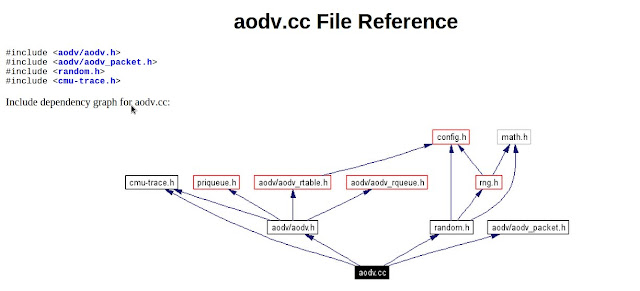
FILE REFERENCE OF AODV.H 


The step by step process happening in AODV network simulation in NS2

1. In the TCL script, when the user configures AODV as a routing protocol by using the command,
$ns node-config -adhocRouting AODV
the pointer moves to the “start” and this “start” moves the pointer to the Command function of AODV protocol.
2. In the Command function, the user can find two timers in the “start
* btimer.handle((Event*) 0);
* htimer.handle((Event*) 0);
3. Let’s consider the case of htimer, the flow points to HelloTimer::handle(Event*) function and the user can see the following lines:

agent -> sendHello();
double interval = MinHelloInterval + ((MaxHelloInterval - Min-HelloInterval) * Random::uniform());
assert(interval -> = 0);
Scheduler::instance().schedule(this, &intr, interval);

These lines are calling the sendHello() function by setting the appropriate interval of Hello Packets.
4. Now, the pointer is in AODV::sendHello() function and the user can see Scheduler::instance().schedule(target , p, 0.0) which will schedule the packets.

5. In the destination node AODV::recv(Packet*p, Handler*) is called, but actually this is done after the node is receiving a packet.

6. AODV::recv(Packet*p, Handler*) function then calls the recvAODV(p) function.

7. Hence, the flow goes to the AODV::recvAODV(Packet *p) function, which will check different packets types and call the respective function.

8. In this example, flow can go to case 
AODVTYPE HELLO:
recvHello(p);
break;
9. Finally, in the recvHello() function, the packet is received.


hope you have got it how to do ...
you can also generate the codes using NSG2

The files related are given below


Simple tool for generating Tcl script : NSG2

Everyone spent a lot of time to write TCL scripts for ns2, Here is a tool to create TCL scripts automatically.NSG2 is created for that. Now, I would like to share NSG2 with you. Hope you would like it.What is NSG2? :

NS2 Scenarios Generator 2(NSG2) is a JAVA based ns2 scenarios generator. Since NSG2 is written by JAVA language, you can run NSG on any platform. NSG2 is capable of generating both wired and wireless TCL scripts for ns2. Some major functions of NSG2 are listed below:
1. Creating wired and wireless nodes
2. Creating connection between nodes
3. Creating links (Duplex-Link and Simplex-Link)
4. Creating agents (TCP and UDP)
5. Creating applications (CBR and FTP)
6. Node movement
Is NSG2 free?
Yes, it is a free software. you can download it from here : download NSG2
Launch NSG2 :
To execute NSG2, you have to install JAVA6.0 first.  The details of JAVA6.0 installation, please refer the link
To execute NSG2 
 open the terminal and run $java -jar NSG2.1.jar
How to use NSG2
1.The nsg2 work space is like this


To create a node just click on the node and click on the workspace where you want the node

Change the agents type, protocols TCP,UDP etc.. and packet size

Then set application type,start time,stop time,rate and interval

Setup the simulation parameters 

Generate Tcl Script and save it 

you can run the Tcl script using your terminal
    check this link  to know how to run a Tcl script


Support : Ebin EPhrem | Ebin Ephrem | #Gabbarism
Copyright © 2011. Services | Embedded Support | Reviews | Virtual Technologys - All Rights Reserved
Template Created by ebinephrem.com Published by Ebin Ephrem
Proudly powered by Blogger